Airbnb allows travelers to discover and book unique local experiences, activities and stays around the world. Connect your Travelotopos supplier account, map your Airbnb listings to your events and let Travelotopos run the Airbnb calendar: departures, capacity and prices are pushed automatically, and every Airbnb booking is created in your account in real time.
Once the integration is complete, the Travelotopos Channel Manager keeps Airbnb in sync for you, so you keep working from one dashboard.
Your calendar, managed for you
Travelotopos creates the departures on your Airbnb listing from your own schedule, up to two years ahead, and keeps their capacity and prices in step while you sell on every other channel.
Bookings in real time
Every booking attempt on Airbnb is checked against your live availability, and confirmed bookings are created in your Travelotopos Administration Panel as they happen.
Every change pushed within minutes
A booking from any channel, a stop sale, a price change or a schedule change updates the affected Airbnb departures automatically, usually within ten minutes.
How to connect your supplier account to Airbnb
Before you start
This guide walks you through everything you need to connect your account and start selling on Airbnb. Two things must be in place before you touch the Travelotopos side.
Action needed: confirm or create your Airbnb Host account
Before signing up to be an Experiences host, each supplier needs to create a host account using their business email. This can be done on Airbnb's home page (“Become a host” in the top-right corner). Once a host account is created, use this sign-up link to add experiences.
Important: publish your Experience before connecting
Before you can connect your Airbnb account to Travelotopos, you must log back in to Airbnb and formally submit and then publish your Experience.
Creating or setting up an Experience is not enough. Your Experience must be formally submitted and published on Airbnb before you proceed with the Travelotopos connection. See what to expect after you submit for what happens between submitting and being able to publish.
Please note: your Experience will not become bookable until you connect your availability via Travelotopos.
Checklist: have the following ready
An active Airbnb Host account
At least one published Experience in Airbnb
Your experience set up as an “Experience” type (not accommodation or other services)
Group type set to either Public Group or Private Group
No external calendars connected to your Airbnb listing
Matching pricing structure between Travelotopos and Airbnb
Same time zone set in both Travelotopos and Airbnb
The published period of your event set in Travelotopos; Airbnb shows departures up to two years ahead
What to expect after you submit
Submitting your Experience is not the same as publishing it. Once you submit, Airbnb reviews your listing for content quality, photos and policy compliance. This process can take up to 2–3 weeks, and not all submissions are approved.
During review, a few things can happen:
Airbnb may send your listing back with notes for you to adjust and resubmit. Review restarts once you resubmit.
You may be asked to provide licenses or proof of insurance. This depends on your activity type and location, and is determined by the legal questions you answer during setup. If it applies, you will receive an email from Evident, Airbnb's document verification partner. Your listing remains on hold until your documents are uploaded and verified, usually 1–3 business days, occasionally longer.
Your listing may not be approved. If it does not meet Airbnb's hosting criteria, it will not be published.
Before you can publish, your Airbnb account must also have:
A verified government ID
A verified phone number
A verified email address
A profile photo uploaded
These are common blockers: hosts often reach “Ready to Publish” and find they cannot complete it because one of the above is missing.
Once Airbnb enables publishing on your listing, you click Publish yourself. Then you are ready to connect via Travelotopos.
Step 1: Connect your Airbnb account
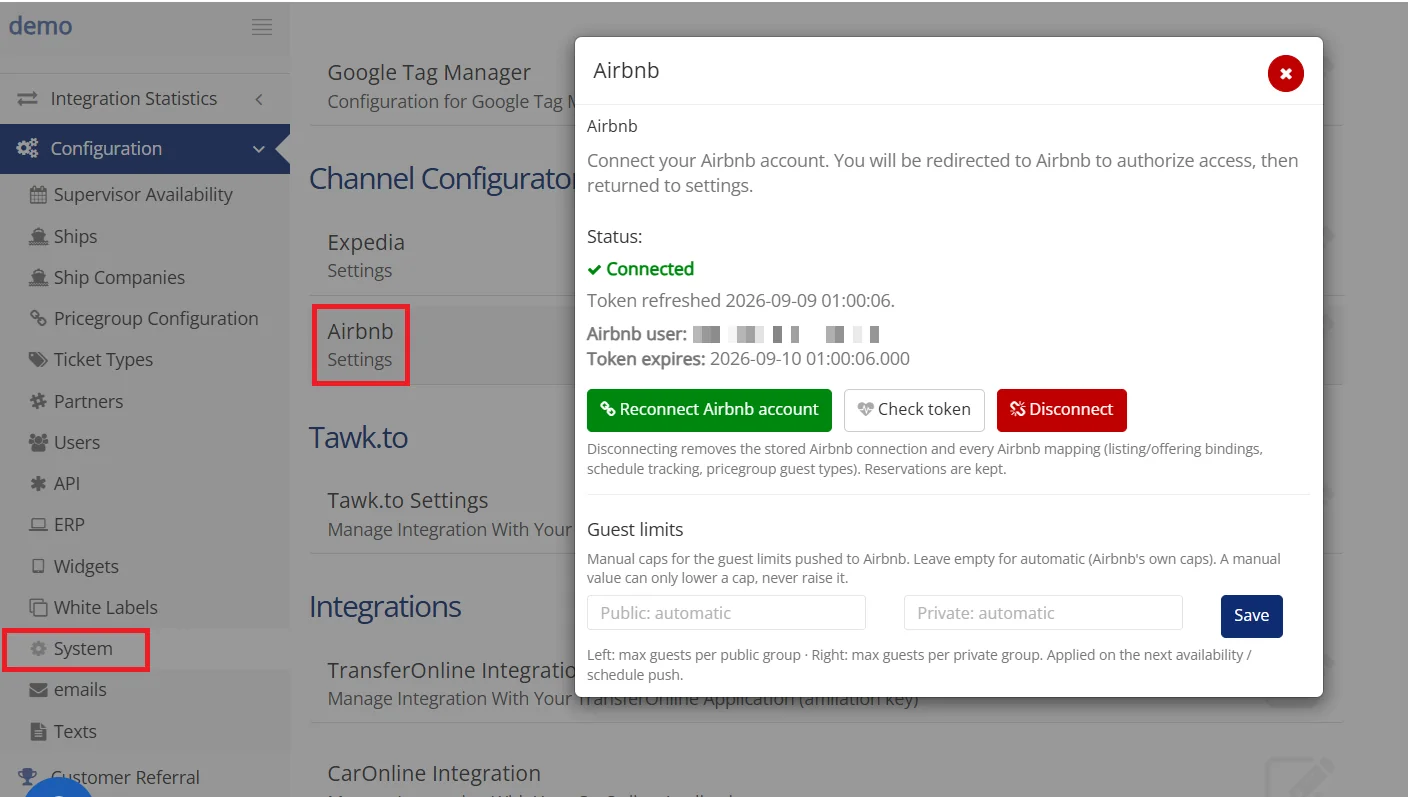
Go to Channel Configurator in your admin panel
Under Airbnb, click Settings
A popup window opens with the Airbnb connection screen
Click Connect Airbnb account
You are redirected to Airbnb to log in
Authorize access to your Airbnb account
You are redirected back to your admin panel
Once completed, the connection status updates to Connected in the same popup. In this state:
You will see your Airbnb user ID and token information
The button changes to Reconnect Airbnb account (used only if you need to refresh or re-authenticate the connection)
Channel Configurator → Airbnb → Settings: the connection popup with status Connected.
Notes
If the account is not yet connected, the button appears as Connect Airbnb account
If already connected, the status shows Connected
Reconnection is only needed if the token expires or access needs to be refreshed
Step 2: Link your products to Airbnb activities
After connecting your account, you need to match your products with your Airbnb listings.
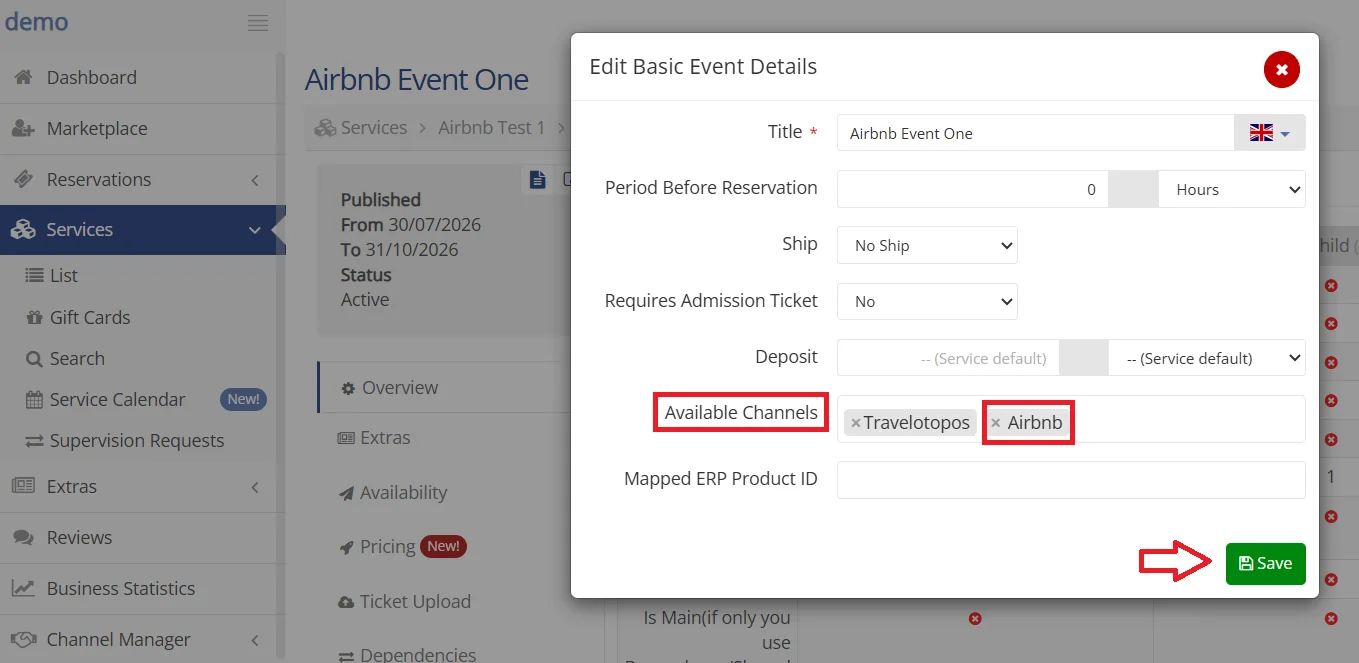
In your Travelotopos admin panel, open your Services list
Select your service and the event you wish to connect
Click the page icon in the grey box and select Airbnb in the Available Channels field
Confirm your selection and click Save
Edit Basic Event Details: add Airbnb to the event's Available Channels and save.
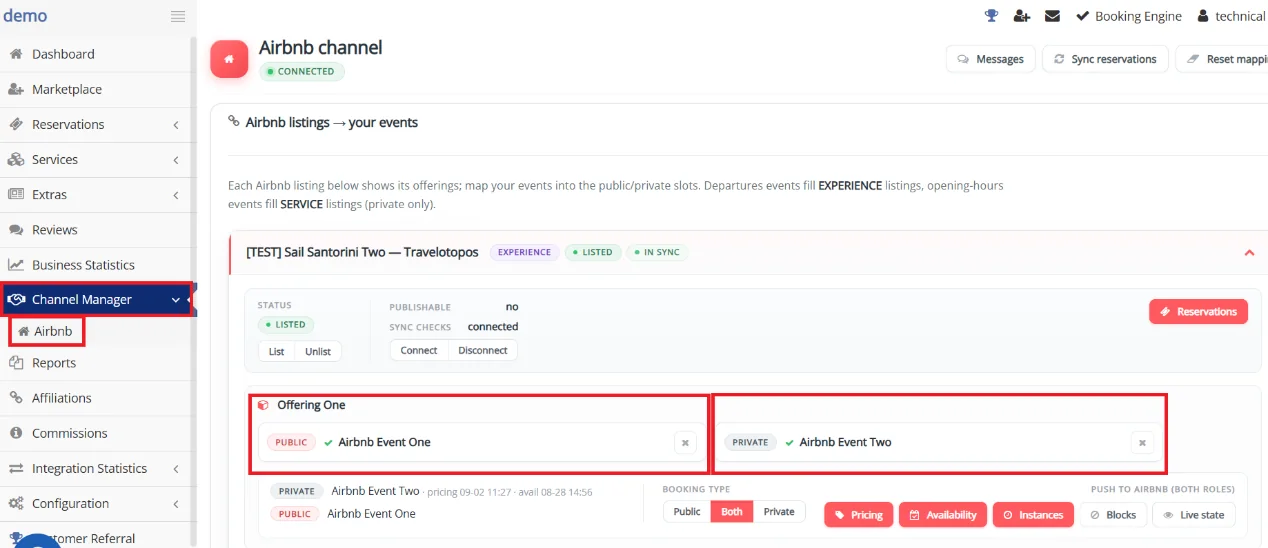
Then, at Channel Manager, click Airbnb and connect your existing Airbnb offerings with your products in Travelotopos.
Channel Manager → Airbnb: each Airbnb listing shows its offerings. Map your events into the public and private slots.
Once saved, the mapping is in place. Nothing has been pushed to Airbnb yet: that is Step 3.
Step 3: Push your calendar to Airbnb
The first push on a listing hands its calendar over to Travelotopos. From that moment Travelotopos is the only source of the departures, capacity and prices on that listing. Everything happens from the listing's card in Channel Manager → Airbnb, in this order:
Look at Publishable on the listing card. If it says yes, click Unlist: the listing is off Airbnb for the few minutes the calendar changes hands, so no guest can book a departure that is about to be replaced. If it says no, do not unlist. Airbnb would not let you list it again until the listing passes its content checks (for example the photo limit). Push with the listing live instead; Travelotopos asks you to confirm.
Click Connect under Sync checks. From now on Airbnb asks Travelotopos for availability on every booking attempt.
Click Pricing to push the offering's prices, then Availability to push group sizes and advance notice.
Click Instances. The first time, this is the calendar takeover described below. A message reports exactly what was done.
If you unlisted, click List to put the listing back on Airbnb.
What the calendar takeover does
Reads every upcoming departure your Airbnb listing already has.
Keeps the ones that match a departure in your Travelotopos schedule, and imports the Airbnb bookings already made on them.
Removes departures that are not in your schedule and have no bookings.
Departures that are not in your schedule but already have guests are kept for those guests and hidden from new bookings. You keep managing those bookings in your Airbnb host account.
Creates every departure of your schedule that was missing, for the whole published period of your event, up to two years ahead.
After the takeover, Instances simply pushes your current schedule again, and Live state shows what Travelotopos holds for the listing. If departures were ever changed directly in Airbnb, click Resync and repeat this step: the next push reads Airbnb again and takes the calendar over once more.
What happens after you connect
After the first push, the integration manages the following automatically:
Departures, capacity and prices are pushed from your system to Airbnb, usually within ten minutes of a change
Bookings made on Airbnb are checked against your live availability and created in your Travelotopos Administration Panel as they happen
A booking from any other channel, a stop sale, a price change or a schedule change updates the affected Airbnb departures
Important things to know
Once your account is connected:
Departures and availability must no longer be managed directly in Airbnb. If that happens by mistake, use Resync (Step 3)
Airbnb bookings made before the takeover on departures that match your schedule are imported into Travelotopos. Bookings on departures you do not run stay in Airbnb only and are managed there
All pricing updates must be made in Travelotopos. Prices entered directly in Airbnb are overwritten by the next push. Airbnb accepts whole-number prices only. Departure prices follow your Travelotopos pricing automatically; the offering's base prices are pushed with the Pricing button
Only supported experience types and pricing models can be used
Airbnb lists your departures for the whole published period of your event, up to Airbnb's limit of two years ahead. Dates beyond two years are added automatically as they come into range
Single booking flow per activity (no mixed configurations)
If your activity setup differs, you may need to adjust it in Airbnb before mapping.
Troubleshooting & tips
If you do not see your activity in the mapping screen, check that it is published on Airbnb (reminder: a submitted but not yet approved Experience will not appear)
If the connection fails, make sure you are logged into the correct Airbnb Host account
If the first Instances push asks whether to take the calendar over while the listing is live, confirm, or cancel and unlist first if the card says the listing is publishable
If Airbnb refuses to list the listing again, its message names a content rule of the listing itself, for example a limit on the number of photos. The card's Publishable value tells you in advance whether listing will work. Fix the content in your Airbnb host account and click List again; your calendar is already in place
A Needs attention badge on an offering means Airbnb rejected part of the last push. The message under the offering says why; fix the cause and push Instances again
Sync may take a few minutes to reflect changes
If your listing has been in review longer than 3 weeks, or you have received a request that you have questions about, contact Airbnb through your host account
Need help?
If you experience any issues during the setup or connection process, please contact the Travelotopos support team at support@travelotopos.com.
Best practices
To help ensure a smooth onboarding process and maximize your Experience listing on Airbnb:
Start early. Begin the submission process well ahead of when you want your Experience(s) to be live.
Make sure your Experience details, photos and pricing are accurate and up to date before publishing.
Complete all required steps in your Airbnb Host account and formally publish (submit) your Experience before connecting it to Travelotopos.
Once connected, manage your departures, availability and pricing through Travelotopos only. Changes made directly in Airbnb are overwritten by the next push.
Keep your Experience listing up to date to provide guests with accurate information and the best possible booking experience.
When will my Experience become bookable on Airbnb?
Your Experience will not become bookable until it has been formally published on Airbnb and your availability has been connected via Travelotopos.
Where should I manage my pricing after connecting to Travelotopos?
Once connected, pricing should be managed through Travelotopos. Prices entered directly in Airbnb are overwritten by the next push. Airbnb accepts whole-number prices only. Departure prices follow your Travelotopos pricing automatically, usually within ten minutes of a change.
What happens to the departures already on my Airbnb calendar?
The first Instances push takes your Airbnb calendar over. Departures that match your Travelotopos schedule are kept, together with their existing bookings, which are imported. Departures that are not in your schedule are removed if they have no bookings, or kept for their guests and hidden from new bookings if they do. Everything missing from your schedule is created.
How far ahead does Airbnb show my departures?
For the whole published period of your event, up to Airbnb's limit of two years ahead. Departures beyond two years are added automatically, day by day, as they come into range.
Why was my Experience not approved?
Every Experience is reviewed by Airbnb against its quality, content and policy standards, and not all submissions are approved. To qualify, your Experience must have an average rating of 4.8 or higher on a trusted review platform (e.g. Google or Tripadvisor). You can review Airbnb's full requirements to host.
Ready to list on Airbnb?
Connect your Travelotopos booking engine to Airbnb Experiences and start receiving Airbnb bookings in your admin panel. Our team is here to help you through every step.